A music proposal your client can play, read and accept
Proposals in DropCue Studio turn an RFP response or a job pitch into one private page: a cover with the client, project, reference and valid-until date, your approach and timeline, past work that plays right on the page, a fee table, and an Accept button. When the client accepts, the linked pitch moves to Placed, the client is added to Clients & Licenses and you get an email.
Get Studio →See a live proposal →
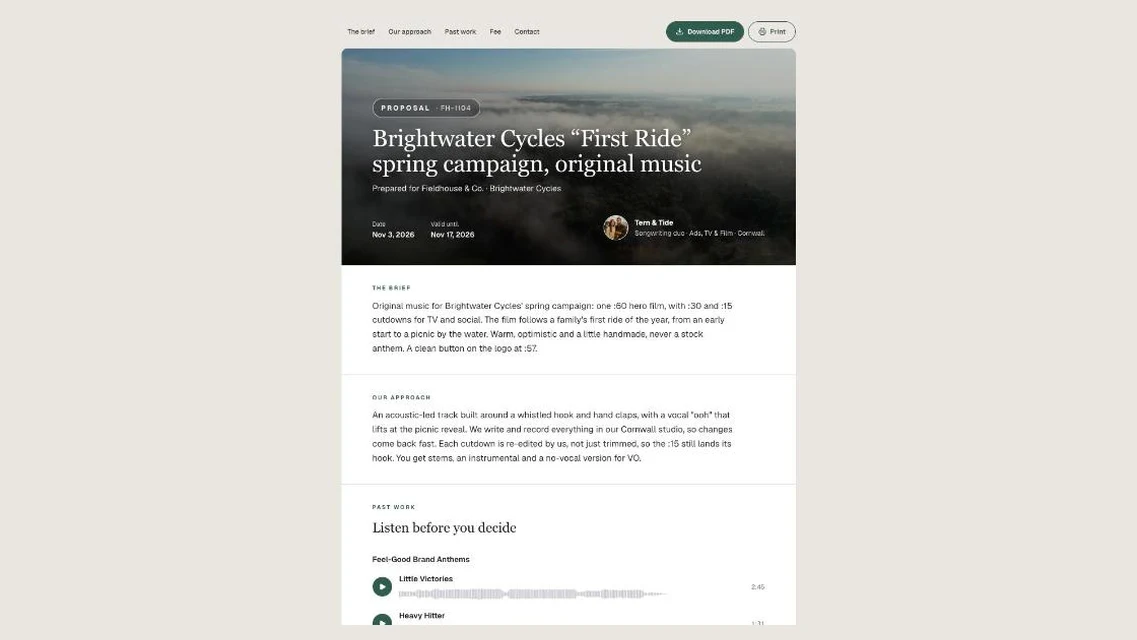
Tern & Tide, a songwriting duo, pitching original music for a Brightwater Cycles spring campaign through Fieldhouse & Co.
Watch it in action
Watch: Proposals walkthrough: answer an RFP with music your client can play (1:17)
Answer an RFP or pitch a job with one page your client can play, read and accept. Start from a pitch, add your fee, write the brief with Live preview, star your past work, send one link and get the yes. Part of the Business Suite on DropCue Studio.
Everything a client needs to say yes
A cover that says who it is for
Client, project title, reference number, date and a valid-until date, over your accent colour or your banner image. Your name and tagline sit on the cover too.
Your approach in your own words
Write the brief, your approach and a timeline as sections, the same way you build any portfolio page. Put them in the order you want the client to read them.
Past work that actually plays
Star the releases to show as past work. Every track plays right on the page with its waveform, and videos open in the page's theater, so the client hears the work instead of reading about it.
A clear fee table
Up to 12 lines, each with a label, a short detail and an amount typed the way you quote it, like £8,500 or Included. Add a total line, or leave it blank to hide it.
Accept and Ask, built in
Accept proposal asks for the client's name, plus an optional email and note, and records it once. Ask a question opens an email to the first of your contacts with an email address. Contact cards at the bottom list each person with their role, email and phone.
A PDF that still plays
Download PDF keeps just the document. Past work on paper carries a QR code and a link back to the page, so the music still plays from a printed or emailed copy.
See where every proposal stands
The Proposals list shows each one as Draft, Sent, Opened, Accepted or Expired, with how many times it was opened and played. A valid-until date inside the next week is highlighted, so nothing lapses quietly.
Acceptance updates the rest of your business
The linked pitch moves to Placed in Pitch Pipeline, the client gets a row in Clients & Licenses, Calendar shows the expiry and acceptance dates, and Draft the agreement opens the Agreement Generator with the client, project, reference and fee filled in.
How it works
1. Start a proposal
Click New proposal on the Proposals page, or open a pitch in Pitch Pipeline and choose Write a proposal. From a pitch, the client and project are filled in for you.
2. Write it and add the work
Fill in the cover and the fee table, write your brief, approach and timeline as sections, and star the releases to show as past work. On a wide screen, Live preview shows the real page beside the editor as you type.
3. Publish and send the link
Publish when it is ready, then copy the link or download the PDF. The Proposals list tells you when it was opened and played.
4. Get the yes
The client presses Accept proposal. You get an email, a linked pitch moves to Placed, the client lands in Clients & Licenses, and Draft the agreement starts the paperwork.
Frequently asked questions
What should a music proposal include?
A good music proposal answers five things on one page: who it is for and what the project is, how you plan to approach the music, when each stage will be delivered, proof you can do it (past work the client can play), and what it costs, with the licence terms spelled out. DropCue's Proposal page has a place for each: a cover with client, project, reference and valid-until date, your approach and timeline as sections, past work that plays, a fee table, and Accept and Ask a question buttons.
How do I respond to a music RFP as a composer?
Restate the brief in a sentence or two so the client knows you read it, explain your creative approach, lay out a timeline with demo and revision rounds, show two or three pieces of relevant past work, and quote a fee broken into composition, versions and licence. In DropCue Studio you can write all of that as one Proposal page, send it as a link or a PDF, and see when the client opens it and plays the music.
Is there a music proposal template I can use?
Yes. Proposal is a DropCue page design built for RFP responses and job pitches. You start from New proposal, or from a pitch in Pitch Pipeline with the client and project already filled in, and fill in the cover, sections, past work and fee table. Duplicate any proposal to reuse it as the starting point for the next one.
What happens when the client accepts the proposal?
The client presses Accept proposal and adds their name, and optionally an email and a note. A proposal can be accepted once. You get an email, the linked pitch moves to Placed in Pitch Pipeline with a note on its timeline, the client is added to Clients & Licenses, Calendar marks the day it was accepted, and Draft the agreement opens the Agreement Generator with the client, project, reference and fee filled in.
Can a client accept after the proposal expires?
No. After the valid-until date has passed, the Accept button stops taking acceptances and asks the client for an updated proposal. Proposals with a password cannot be accepted online either; the client replies by email instead.
Can the client listen to the music from the PDF?
Yes. Download PDF keeps just the document, and past work on paper carries a QR code and a link back to the page, so the music still plays from a printed or emailed copy. Audio embedded inside a PDF only plays in Adobe Acrobat, so the link is the reliable way.
Will my proposal show up on Google or in my portfolio?
No. Proposals are private pages: they never appear in your portfolio list, never count toward your portfolio limit and are never listed in search engines. Only people with the link can open one.
Which DropCue plan includes Proposals?
Proposals is part of the Business Suite on the DropCue Studio plan, which starts at $29/mo billed annually ($33 month to month) and scales by catalog size up to $99/mo annually ($119 month to month). Studio also includes Pitch Pipeline, Project Planner, the Agreement Generator, Clients & Licenses and the rest of the Business Suite.
Included with DropCue Studio
The rest of the Business Suite
Part of DropCue Studio's Business Suite: find the work, pitch it, sign it, track it, and get paid, all in one app.