DropCue API & AI assistants
DropCue API & AI assistants: run your catalog by asking.
DropCue is a music catalog and pitching platform with a REST API and an MCP server, so Claude, Codex or any AI assistant that supports MCP can work in your account, and your own scripts can too. Upload a folder of tracks or videos, fix metadata across hundreds of tracks, build a playlist, or check on a pitch, all in plain English.
TL;DR: DropCue has a REST API and an MCP server, so AI assistants such as Claude and OpenAI Codex can work in a composer's DropCue account: search the catalog, upload folders, edit metadata in bulk, build playlists, albums and tracked share links, and manage pitches, contacts, projects, licenses and royalties. It cannot delete tracks, playlists or contacts, never emails anyone, and previews uploads before they run. Included with paid DropCue Studio. Mac for now.
See Studio plans →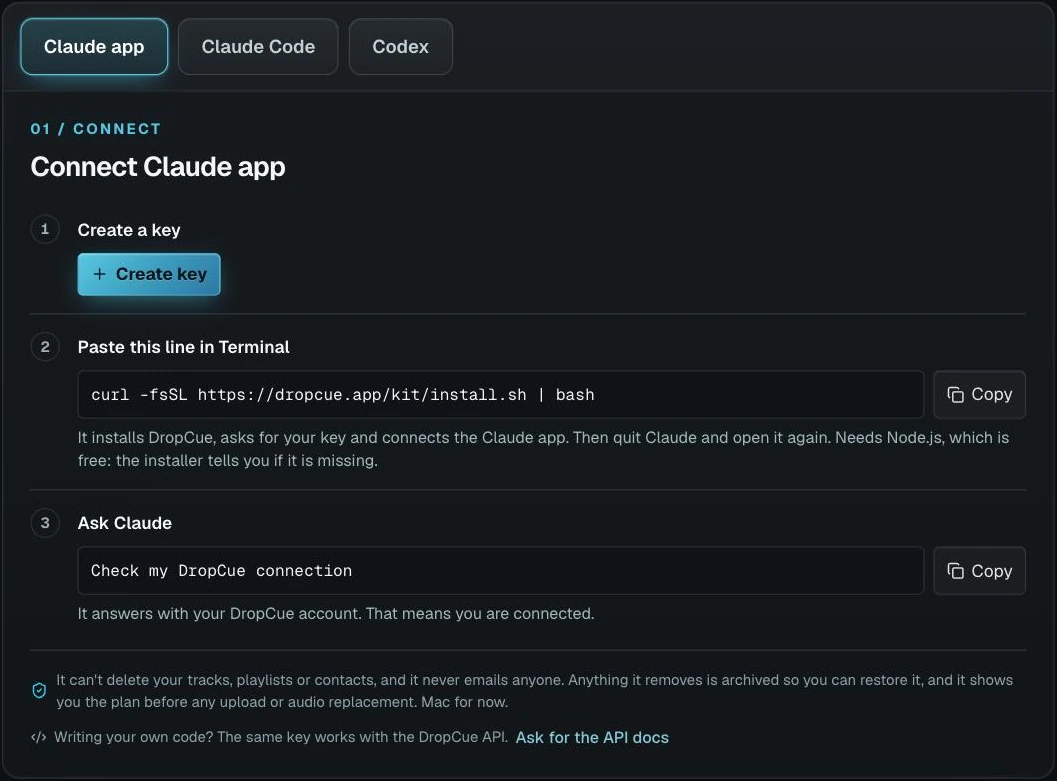
What your assistant can do in DropCue
Find anything in your catalog. Search by title, writer, genre, mood, key, tags and BPM range, and read every stored field on a track.
Upload folders from your computer. The assistant proposes main tracks and their versions, shows you the plan, and uploads only after you confirm.
Clean up metadata in bulk. Fill in moods, keywords, BPM and descriptions across hundreds of tracks, nest versions under their main track, replace audio with a new master, and set cover art.
Build playlists, albums and links. Draft playlists from a search, build albums, choose a page design, and make a tracked share link for one supervisor, after asking you first.
Run the business side. Log pitches and follow ups, keep contacts and the companies they work at, and plan client jobs cue by cue with a deliverables checklist.
Licenses and royalties. Log a license with its client, fee and terms, attach the invoice, import a PRO statement, and ask what a track or a network has earned.
Upload videos from Claude or the API
Musicians, filmmakers and editors can send music videos, cuts and screeners to their DropCue library the same way they send audio: ask Claude, or call POST /uploads.
- H.264 MP4 only, up to 1 GB per file. HEVC, ProRes and AV1 files are refused with a message naming the codec.
- Every video needs a thumbnail: a JPG, PNG or WebP up to 10 MB, which becomes its artwork. Name one, or the DropCue kit takes a frame from 3 seconds in.
- The API completes up to 5 videos per request, and the kit splits a bigger folder into batches for you.
- Video needs Pro or higher in the app, and the API and the Claude connection come with paid Studio.
- Videos have no waveform or MP3 preview, are never a version of another track, and their file cannot be replaced. Export with fast start so they play instantly.
Try asking: "Upload the MP4 cuts in my Desktop folder Spring Reel. Use poster.jpg as the thumbnail for the trailer." Claude shows the plan first and uploads after you confirm.
Connected in three steps
1. Create a key. In DropCue, open Settings, then API & AI assistants, and click Create key.
2. Paste one line in Terminal. curl -fsSL https://dropcue.app/kit/install.sh | bash installs DropCue, asks for your key, and connects Claude Code, the Claude app and Codex.
3. Ask your assistant. Try "Check my DropCue connection". It answers with your DropCue account.
An API without an enterprise contract
As of September 2026, DISCO lists API access only on its Enterprise plan, with custom pricing you request from its sales team, and ReelCrafter does not list an API. Neither lists a way to connect Claude or Codex. DropCue includes the API and the AI assistant connection with every paid Studio plan, from $29 a month billed annually. Sources: disco.ac/pricing and reelcrafter.com/pricing, checked September 28, 2026.
Your catalog stays yours
The assistant cannot delete your tracks, playlists or contacts, and it never emails anyone. Anything it removes is archived so you can restore it. Writers, publishers and ISRCs are left alone. Uploads, audio replacements and stem runs show a preview and wait for your yes, and a stem run states its credit cost first. Access uses a personal key kept in your Mac Keychain, never in the chat, and a key can be switched off at any time.
Frequently asked questions
Which AI assistants work with DropCue?
DropCue connects through MCP, the open standard AI assistants use to work with other apps. It is tested with Claude (Claude Code and the Claude desktop app) and with OpenAI Codex, and any assistant that supports MCP servers can use it.
What is MCP?
MCP, the Model Context Protocol, is an open standard that lets an AI assistant use tools in other apps. DropCue ships a small MCP server that runs on your computer and talks to your DropCue account, so your assistant can search, upload and organize your catalog when you ask it to.
Can the assistant send music or email on its own?
No. It never emails anyone, and it cannot delete your tracks, playlists or contacts. The one thing it can make public is a share link, and it asks you before it makes one. Uploads, audio replacements and stem runs all show you a preview first.
Is there a DropCue API for developers?
Yes. The same key works with the DropCue REST API, so you can script uploads, metadata, playlists and share links, or connect DropCue to your own tools. It is documented with an OpenAPI spec: email hello@dropcue.app for a copy.
Does DISCO or ReelCrafter have an API?
As of September 2026, DISCO lists API access only on its Enterprise plan, with custom pricing you request from its sales team, and ReelCrafter does not list an API. Neither lists a way to connect Claude or Codex. DropCue includes the API and the AI assistant connection with every paid Studio plan, from $29 a month billed annually.
Can I upload videos to my DropCue catalog from Claude?
Yes, on paid Studio. Ask Claude to upload a folder of H.264 MP4 files, up to 1 GB each. It shows you the plan first and uploads after you say go. Every video needs a thumbnail, a JPG, PNG or WebP up to 10 MB: name one, or the DropCue kit takes a frame from 3 seconds in. The same works through POST /uploads in the API.
Does it work with my existing catalog?
Yes. It works on the same library you use in the DropCue app. Anything it changes shows up in the app right away, and anything you change in the app is what it reads.
Which plan do I need?
The API and the AI assistant connection come with a paid DropCue Studio plan, along with the Business Suite. Paid Studio team seats get it too. Trials do not include it.
How do I set it up?
In DropCue, open Settings, then API & AI assistants, and create a key. Paste one line into the Terminal app on your Mac: it installs DropCue, asks for your key and connects Claude Code, the Claude app and Codex. Then ask your assistant to check your DropCue connection. Mac for now.