Project Planner
Know exactly what you still owe on every job
Project Planner is where a client job or an album lives before the music exists. Lay out every cue with its due date and status, check off the mixes, versions and stems each one needs, and turn the finished tracks into one approval playlist, ready to share. Part of the DropCue Studio Business Suite, built for composers juggling several projects at once.
Start Free Trial →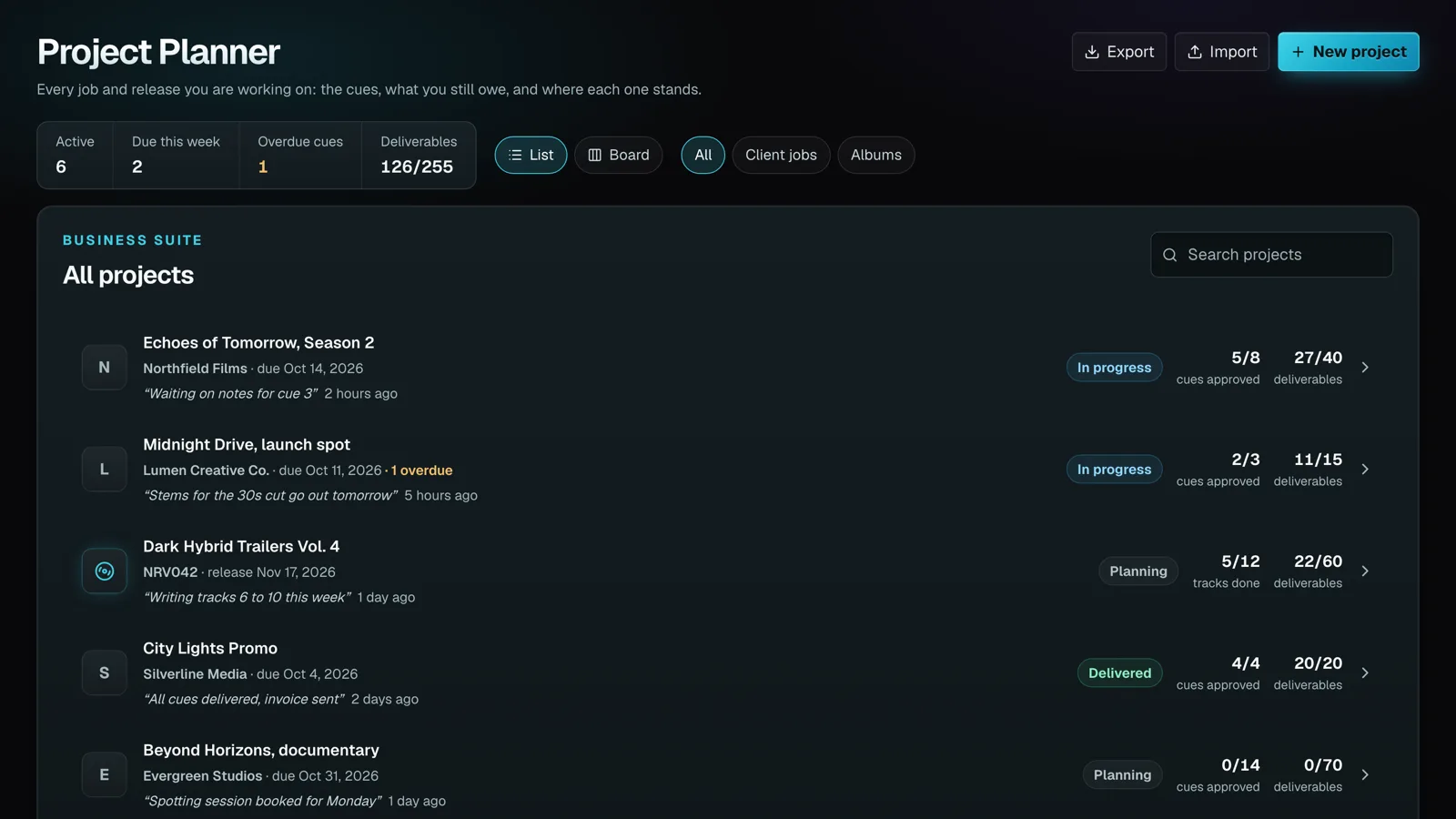
What you get
Every cue in one list
Each cue gets a working title, a target length, a status (planned, writing, sent, revisions, approved, delivered or cut), a due date, a fee and a place for notes and client feedback. Planned cues never count toward your track limit. Only uploaded audio does.
A checklist of what you owe
Every cue carries its own deliverables: full mix, no-vocals mix, versions and stems by default, and you can change the list per cue or for the whole project. The Deliverables tab puts every cue's checklist in one grid, so nothing goes out short.
It spots what you already made
Link a cue to its track in your library and DropCue shows "Found in your library" when a matching version or set of stems already exists. Nothing gets ticked until you tick it, so the checklist stays a record of what you actually sent.
A status line in your own words
One line under the project title, like "Waiting on notes for cue 3", changed with a click. Old lines stay in the Activity tab, next to every play and download of the project's tracks.
Build the approval playlist in one click
Share for approval turns the linked tracks into a playlist with one section per cue, ready to share. On an album, Build album makes or updates the album from the tracks in order.
Keep the brief and the deal with the job
Paste the brief, then record the deal: flat fee, fee plus sync split, sync split only, buyout or work for hire. Put one total fee on the project, or a fee on each cue and let the page add them up.
How it works
1. Start a project
Pick Client job or Album, name it, set the due or release date and start with up to 50 empty cues. Add more any time. A client job belongs to a company; an album gets a catalog code that numbers its tracks, like NRV042-01.
2. Plan the cues
Fill in titles, target lengths, due dates and fees, and set the deliverables each cue needs. The brief and the deal live on their own tab, so the whole job is on one page.
3. Write and deliver
Upload straight from a cue or link a track already in your library. Tick each deliverable as it goes out and update the status line so you always know where things stand.
4. Get it approved
Share for approval turns the linked cues into one playlist you can send from DropCue, and the Activity tab lists every play and download of the project's tracks. Every job sits in a list or a board, so you can see all of them at once.
Common questions about music analytics
How do composers keep track of cues and deadlines across several projects?
Most use a spreadsheet per job and an inbox full of revision notes, which is how a stem request or a cue due date gets missed. DropCue Studio's Project Planner keeps every client job and album in one place: each cue with its due date, status and fee, a checklist of the deliverables it needs, and a one-line status for the whole project. The list and board views show every job at once, with overdue cues flagged.
What deliverables does a sync or library cue usually need?
Usually a full mix, an instrumental or no-vocals mix, alternate versions or cutdowns, and stems, though every client and library asks for something slightly different. Project Planner starts each cue with that checklist (full mix, no-vocals mix, two versions and stems) and lets you change it for one cue or for every new cue on the project.
Do planned cues count against my track limit?
No. A cue you have planned but not written is just a row in the planner. It only counts toward your plan's track limit once you upload audio for it, the same as any other track in your library.
Can I plan an album or library release, not just client work?
Yes. Choose Album when you create a project and it gets a catalog code, a release date and tracks numbered from that code, like NRV042-01. When the tracks are done, Build album makes the album in your DropCue library from them in order, and running it again updates it.
Can I import my existing projects from a spreadsheet?
Yes. Project Planner imports a .csv or .xlsx file where only the Title column is required. A company that is not on your list yet is added for you, and a project already in your planner for the same company is skipped, so a file you exported can be edited and imported again. You can export every project to CSV at any time.
What does Project Planner cost?
Project Planner is part of the DropCue Studio plan, which starts at $33/mo and scales by catalog size up to $119/mo. Studio includes the full Business Suite, and you can try all of it free for 7 days.
Included with DropCue Studio
The rest of the Business Suite
Part of DropCue Studio's Business Suite — find the work, pitch it, sign it, track it, and get paid, all in one app.