New in DropCue: Music Proposals Your Client Can Accept, and a Live Preview for Your Portfolio
The short version
Two things are new in DropCue this month. Proposals lets you answer an RFP or pitch a job with one private page: your approach, past work that plays, your fee and an Accept button. When the client accepts, DropCue moves the pitch to Placed, adds the client to Clients & Licenses and emails you. And the portfolio editor has been rebuilt around a Live preview: the real page sits beside the editor and changes as you type.
Proposals is part of the Business Suite on the Studio plan. Live preview is in the portfolio editor on every plan that has a portfolio.
Proposals: a pitch the client can play and accept
A lot of music proposals still go out as a PDF with a Dropbox link pasted at the bottom. The client reads the fee, maybe clicks the link, and the reply comes back as "let me check with the team." A Proposal puts the whole pitch on one page, and the music is part of it.
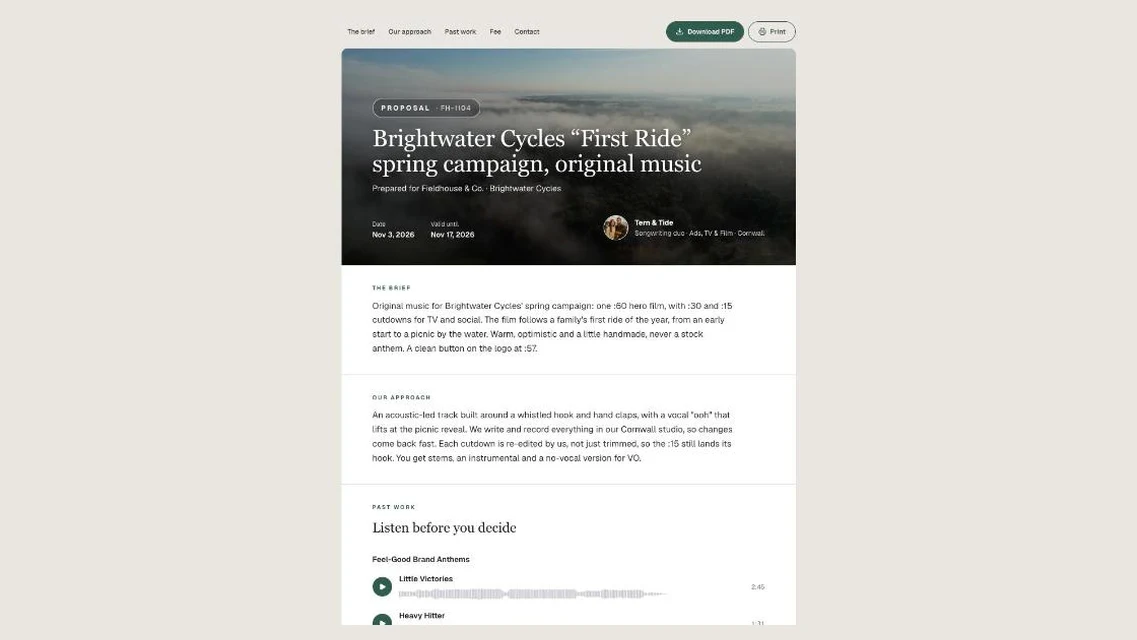
Here is what a Proposal holds:
- A cover. Client, project title, reference number, date and a valid-until date, over your accent colour or your banner image.
- Your approach. The brief, your approach and a timeline, written as sections, in the order you want them read.
- Past work that plays. Star the releases to show. Every track plays right on the page with its waveform, and videos open in the page's theater.
- A fee table. Up to 12 lines, each with a label, a short detail and the amount as you quote it, like £8,500 or Included, plus a total line.
- Contact cards for each person on the job, with role, email and phone.
- Accept proposal and Ask a question. Accept takes the client's name and an optional email and note. Ask a question opens an email to the first of your contacts with an email address.
- Download PDF. The PDF keeps just the document, and past work carries a QR code and a link back to the page, so the music still plays from a printed copy.
See a real one: Tern & Tide's proposal comes from a songwriting duo pitching original music for a Brightwater Cycles spring campaign through the agency Fieldhouse & Co. It has the cover, the approach, playable past work and a fee table broken into composition, cutdowns and a 12 month licence. There is a second example from the trailer label Stonewake.
Two ways to start one
- From the Proposals page. Open Proposals under Business Suite and click New proposal. It starts as a private draft.
- From a pitch. Open a pitch in Pitch Pipeline and choose Write a proposal. The client and project are filled in for you, and the proposal stays linked to that pitch.
When it is ready, publish it, then copy the link or download the PDF. The Proposals list shows every proposal as Draft, Sent, Opened, Accepted or Expired, with how many times each was opened and played, so you know whether the client listened before you follow up. A valid-until date inside the next week is highlighted. Duplicate any proposal to use it as the starting point for the next job.
What happens when the client says yes
The client presses Accept proposal and adds their name. A proposal can only be accepted once, and then:
- You get an email with their name, their note, and buttons to open Proposals or draft the agreement. Reply to it and the reply goes straight to the client, when they left an email.
- The linked pitch moves to Placed in Pitch Pipeline, with a note on its timeline.
- The client is added to Clients & Licenses, ready for the paperwork.
- Calendar marks the day it was accepted. Open proposals also show on Calendar on the day they expire.
- Draft the agreement opens the Agreement Generator with the client, project, reference and fee already filled in. Everything stays editable.
After the valid-until date, the page stops taking acceptances and asks the client for an updated proposal. A proposal with a password can't be accepted online; the client replies by email instead. Proposals never show in your portfolio list, never count toward your portfolio limit, and are never listed in search engines.
For the full feature list, see the music proposal template page.
How to write a music proposal that gets accepted
The tool helps, but the content wins the job. A proposal that lands usually does five things:
1. Restate the brief in two sentences. It proves you read it, and it catches a misunderstanding before you write a note of music. 2. Explain your approach in plain words. What the music does at each moment of the picture, not a list of instruments. 3. Give a timeline. First demos, revision rounds, final delivery. Clients buy certainty as much as sound. 4. Show two or three pieces of past work that fit. Fewer, closer matches beat a long reel. On a Proposal they play on the page, so the client never leaves to listen. 5. Break the fee down. Composition, versions and cutdowns, stems, and the licence with its media, territory and term. A line that says Included for revisions and stems answers the next question before it is asked.
Set a valid-until date. It gives the client a reason to decide, and it gives you a clean moment to follow up.
The new portfolio editor, with Live preview
The portfolio editor has been rebuilt so you can see the page while you change it.
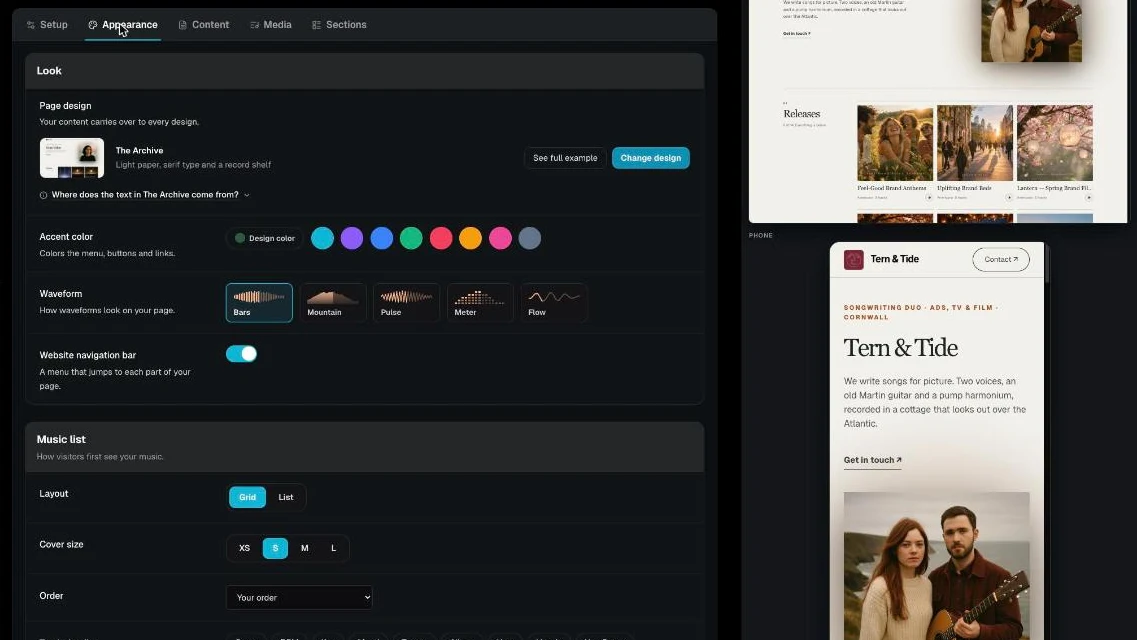
- Live preview. The real page sits beside the editor, open by default, and updates as you type: text, design, colours, images and sections. Switch between Desktop, Phone or Both, and drag the edge to make the preview wider or narrower. Music changes show after you save. Live preview needs a screen at least 1280px wide.
- Five tabs in workflow order. Setup, Appearance, Content, Media and Sections, so the music comes before the extras.
- One dropdown for all your portfolios. Click the portfolio name in the header to switch between pages or start a new one.
- Choose saved. Under Logo, Banner and Photo, Choose saved reuses an image from your artwork library. It only offers images that fit the box: square images for the logo and photo, wide ones for the banner.
- Build my page offers every design. The quiz still suggests four looks, and See all 12 designs lets you build with any portfolio design.
Watch: DropCue portfolio Live preview walkthrough: designs, colors, bio and sections before you save
Proposals use the same editor, so Live preview works there too. The Accept button in the preview explains itself instead of accepting.
Frequently Asked Questions
What is a music proposal?
A music proposal is the document a composer, producer or music team sends to answer an RFP or pitch a job. It covers the brief, the creative approach, a timeline, relevant past work and the fee with the licence terms. In DropCue it is a private page the client can play, read and accept.
Which plan includes Proposals?
Proposals is part of the Business Suite on DropCue Studio, which starts at $29/mo billed annually ($33 month to month) and goes up to $99/mo annually ($119 month to month) depending on catalog size.
Can I turn a pitch in Pitch Pipeline into a proposal?
Yes. Open the pitch and choose Write a proposal. The client and project are filled in, and when the client accepts, that pitch moves to Placed.
Does the client need a DropCue account to accept?
No. The client opens the link, plays the music and presses Accept proposal. They only type their name, and an email and note if they want to.
Does Live preview work on a phone or laptop?
Live preview needs a screen at least 1280px wide, because the page sits beside the editor. Inside it you can preview the Phone view, the Desktop view or both.