New feature · Reports
See how your music did, for any period.
Plays, listeners, downloads, your top tracks and who played them, from last week to all time. Compare with the period before, then export the whole report as a PDF or spreadsheet. Built into DropCue, the music management platform for composers, artists and labels.
Start my free trial See plans7-day free trial. No credit card. Pro from $15/mo.
The short version
What is a music analytics report?
A music analytics report shows what happened to the music you sent out over a period: how many people opened it, which tracks they played and downloaded, who they were and where they listened. DropCue builds one for any period you pick, from the playlists, albums, portfolios and embeds you share, and turns it into a PDF or spreadsheet in one click.
- Any period, compared with the one before
- Tracks ranked by plays, downloads and listens to the end
- Named listeners and the companies they work for
- PDF, Excel or CSV export, on Pro and Studio
What is in a report
Any period, and the one before it
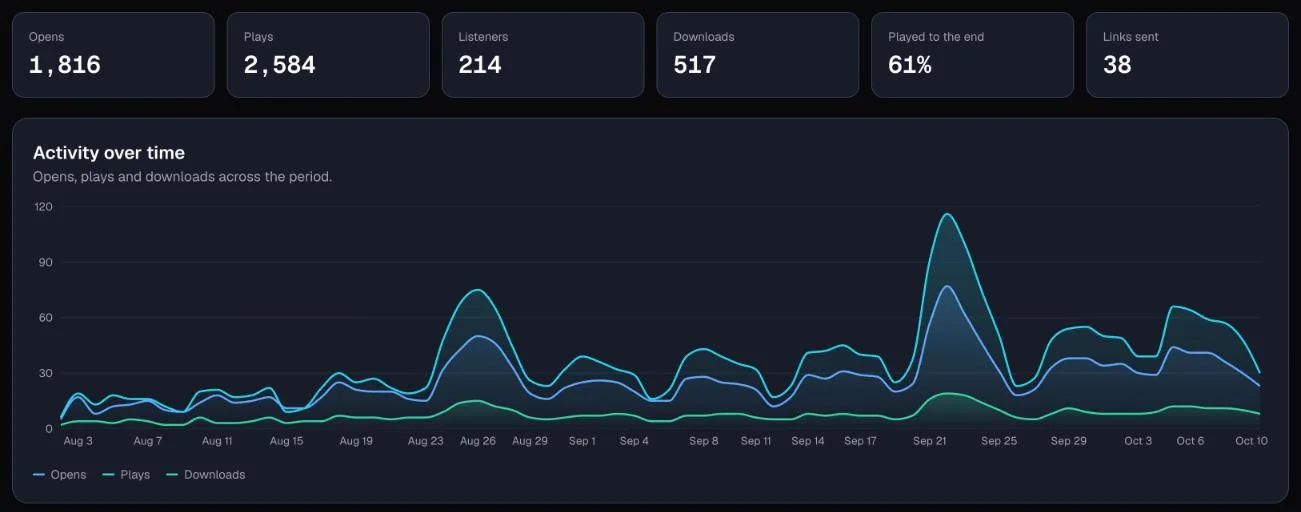
Pick the last 7, 30 or 90 days, this month, last month, this quarter, year to date, the last 12 months, all time, or your own first and last day. Turn on Compare and every number shows whether it went up or down, and what it was in the days just before.
The numbers that matter, at a glance
Opens, plays, listeners, downloads, how often tracks were played to the end, and links sent, with a chart of activity over time. Narrow it all to playlists, albums, portfolios, catalog or embeds.
See how every track travels
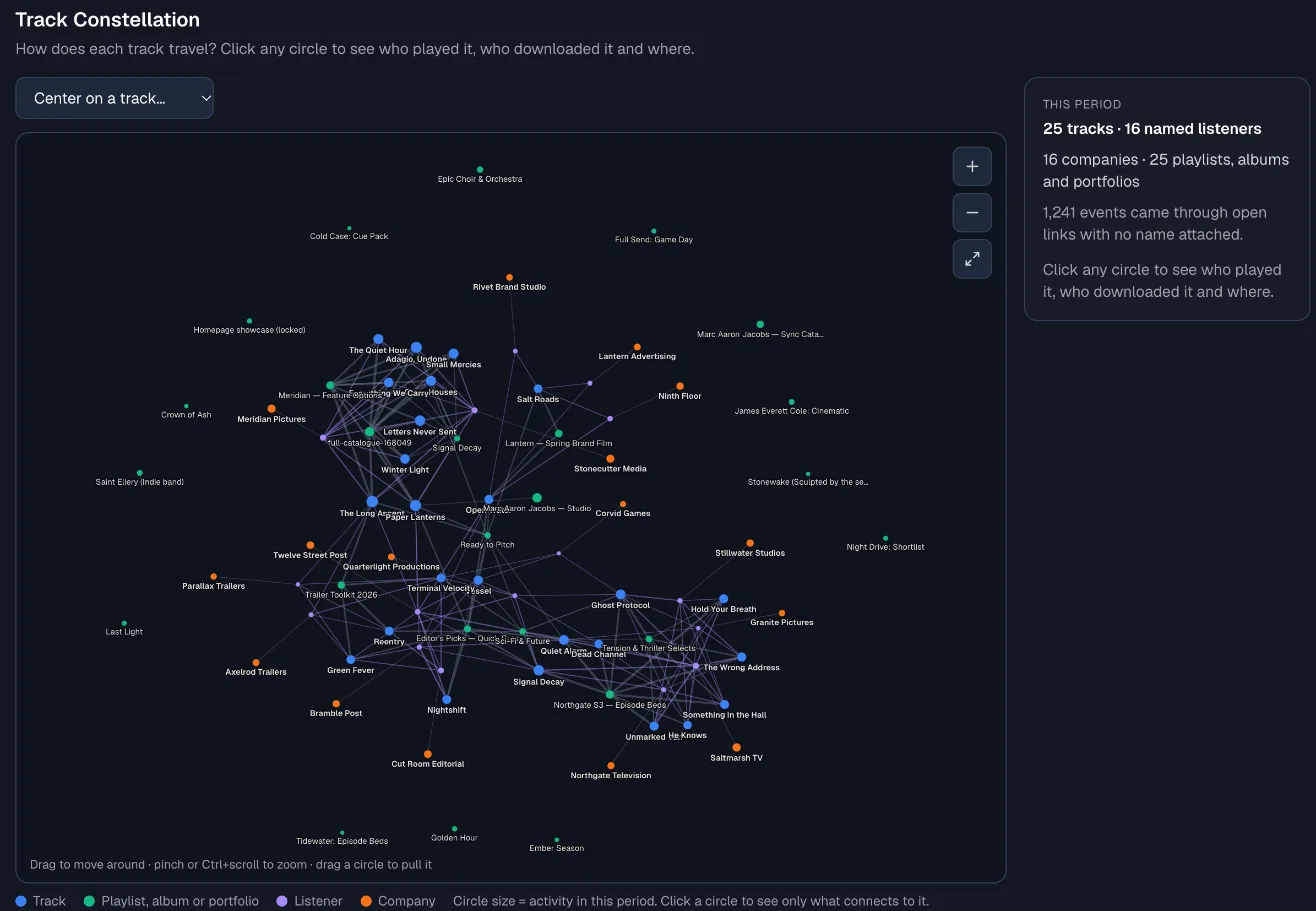
The Track Constellation draws each track, the playlists it was heard on, and the people and companies who played it. Click a circle to list who played it, who downloaded it and where.
Your tracks, ranked
Most played, most downloaded, and least played on your live links. Do people listen to the end? One bar per track shows how many of its plays were heard all the way through.
Who listens, when and where
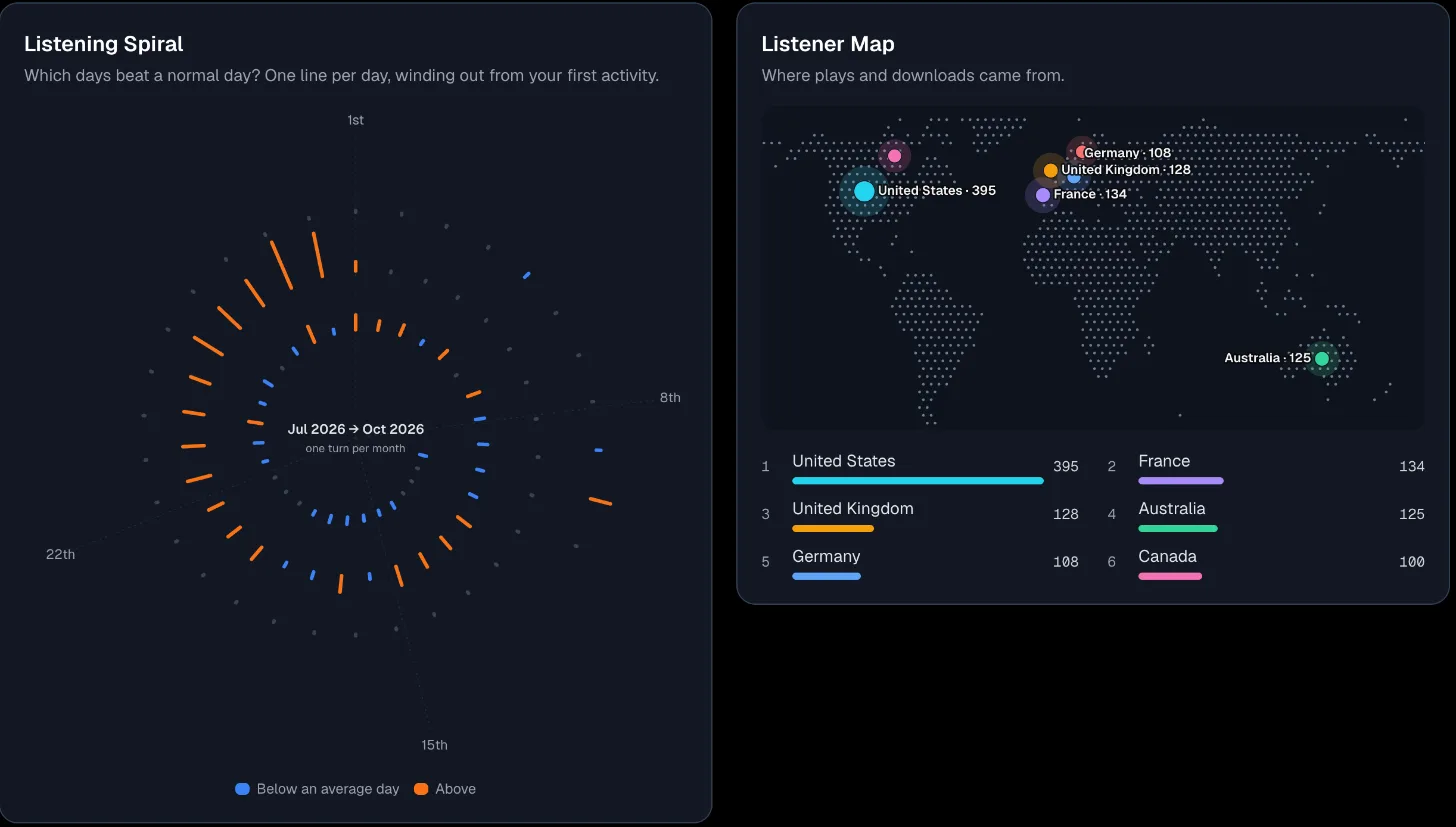
Your most active named listeners and the companies they work for, your busiest playlists and shares, a Listening Spiral of your best days, and a Listener Map of where plays and downloads came from.
Export it, or ask for it
Download the whole report as a PDF with every chart and table, an Excel workbook with one sheet per section, or a ZIP of CSV files. On Studio, ask Claude or Codex for the same numbers through the DropCue API.
See how every track travels
Each track, the playlists it was heard on, and the people and companies who played it, drawn as one map. Drag it, zoom in, and click any circle to see who played it, who downloaded it and where.
Your best days, and where you are heard
The Listening Spiral winds one line per day out from your first activity, colored by whether the day beat an average day. The Listener Map pins where plays and downloads came from, with your top countries listed.
Export: PDF, Excel or CSV
- PDF report. Every section, charts and tables, ready to share. Preview it, then save.
- Excel workbook. One sheet per section, with numbers as numbers.
- CSV files. A ZIP with one CSV per section, for any other tool.
On Studio: your top and lowest earning tracks, from the royalty statements you import into the Royalty Tracker, and a Business tab with the money paid from licenses, license requests, pitches by stage and follow-ups due. You can also ask Claude or Codex for any report through the DropCue API.
Your first report in four steps
1. Start a free trial
Sign up for DropCue. Every plan starts with a 7-day free trial with no credit card, and Reports is included in the trial.
2. Share your music
Send playlists and albums, publish your portfolio, or embed a player. Give each person their own tracked link and the report can name who listened.
3. Open Reports
Click Reports in the sidebar and pick a period. Overview, Connections, Tracks and Listeners are each one click away, and Studio adds Business.
4. Export and share
Press Export report for a PDF, an Excel workbook or CSV files, ready for a client, a label, a manager or your own records.
Reports questions, answered
How do I see which of my tracks music supervisors actually play?
Send each supervisor their own tracked link. DropCue then records every open, play and download against their name, and Reports ranks your tracks by plays, downloads and how often they were heard to the end, for any period you pick. The Track Constellation shows which playlists each track was heard on and who played it, and Listeners groups the people by company.
What is in a DropCue report?
Headline numbers (opens, plays, listeners, downloads, played to the end and links sent), activity over time, your top tracks, listeners and playlists, the Listening Spiral, the Listener Map, the Track Constellation, track rankings and your most active listeners and companies. Studio adds top and lowest earning tracks and a Business tab with license income and pitches.
Can I compare this month with last month?
Yes. Pick a period such as Last 30 days or This month and turn on Compare. Each number then shows whether it went up or down and what it was in the same number of days just before, for example was 56 in the 30 days before.
Can I export a music analytics report as a PDF or spreadsheet?
Yes. Export report, at the top right of Reports, gives you a PDF with every section, chart and table (preview it, then save), an Excel workbook with one sheet per section and numbers as numbers, or a ZIP with one CSV per section.
Does it show royalties per track?
On Studio, yes. Reports lists your top and lowest earning tracks from the royalty statement lines linked to each track, across every statement you have imported into the Royalty Tracker. It also shows how much of your statement money is linked to a track, so unmatched money is never read as a track earning nothing.
Which plans include Reports?
Reports is included on Pro, from $15/mo billed annually, and on Studio, from $29/mo billed annually, which adds earnings per track and the Business tab. Every 7-day free trial includes it. Artist and Starter see a preview of the page.
Do anonymous listeners count?
Yes. Plays from an open link with no name attached count in every total, but there is no name to list, so the report says how many events came from open links. Days are cut in your own time zone.