Workflow
How supervisor feedback rounds actually work
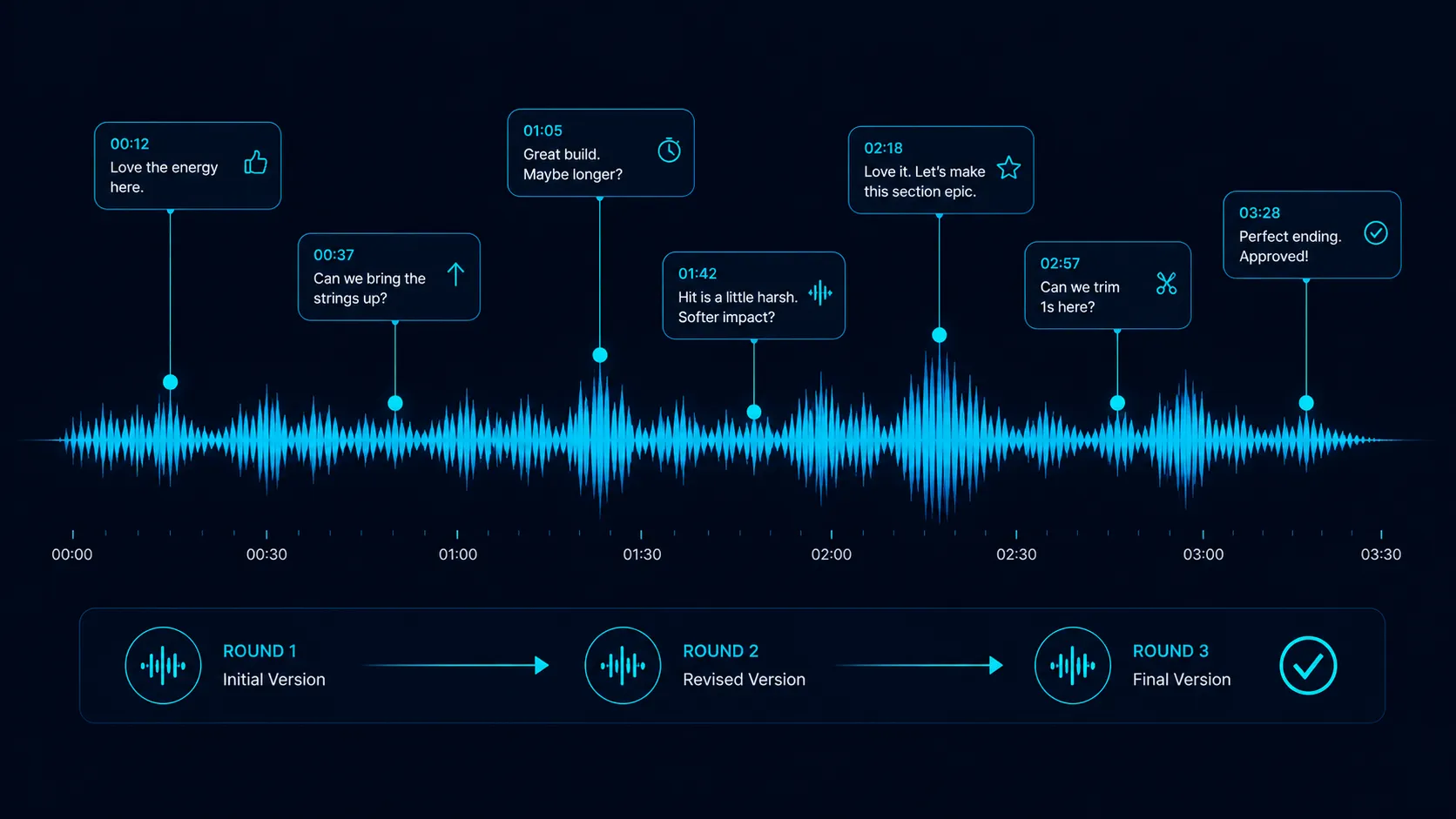
Supervisor feedback rounds happen when a track is shortlisted but not yet locked: the supervisor sends notes to the composer (often timestamped, sometimes vague), the composer revises, and the cycle repeats one to four times before the cue is either approved or replaced. Most placements that fall apart, fall apart here.
Getting shortlisted is a milestone. Surviving feedback rounds is a different skill. Supervisors give notes that range from precise ("trim 4 bars from the bridge, lift the strings 2 dB") to abstract ("can it feel more dangerous"). The composer who reads the room, ships fast revisions, and protects their voice without being precious lands the placement. The composer who debates every note loses it.
Who does this
Music supervisors giving feedback. Composers receiving and applying feedback. Sync agencies mediating between supervisor expectations and composer realities. Editors and directors providing ultimate creative input. Music coordinators tracking version chains.
This is one of the highest-stakes workflows because every round is a chance for the placement to die. A supervisor who gives feedback three times and is still unsatisfied will pull the cue and find a different one.
Step by step
- 1
Track is shortlisted, supervisor delivers initial feedback
Once a cue is shortlisted, the supervisor sends initial feedback. This might be precise (specific timestamps and adjustments) or abstract (vibe direction). Often a mix of both. The supervisor is communicating what the cue does well and what needs to change for it to land in the actual scene.
- ✓Precise notes: bar X, change Y, by Z amount
- ✓Abstract notes: feel more like, less like, different mood
- ✓Often a mix of precise and abstract in the same round
- 2
Composer reads the notes carefully and asks clarifying questions
Most feedback misfires happen here. The composer skims the notes, makes assumptions, and revises in the wrong direction. The cost of one quick clarifying question ("when you say more dangerous, do you mean darker tonally or more rhythmic intensity") is much lower than shipping a wrong revision. Ask before revising on anything ambiguous.
- ✓Precise notes: confirm interpretation if anything is ambiguous
- ✓Abstract notes: ask for reference tracks or scene context
- ✓Tone: collaborative, never defensive
- 3
Apply feedback in a separate session save
Open your DAW project, save it as v2 (or v3, etc.), and apply the feedback to the new save. Never overwrite the original. You may need to revert if the feedback round produces something worse. Version control on revisions is non-negotiable for working composers.
- ✓Save as new version before any edits
- ✓Name the version with date and round number
- ✓Keep notes inside the session about what changed
- 4
Address every specific note explicitly
If the supervisor gave 5 specific notes, address all 5 in the revision. Do not ignore the ones you disagree with. Ignoring a note signals that you did not read carefully or do not respect the supervisor's judgment. Either implement the note or push back politely with a reason and a counter-proposal.
- ✓Every note gets a response (implementation or pushback)
- ✓Pushback always paired with a counter-proposal
- ✓Document what changed for the supervisor reply
- 5
Bounce a fresh version with a clear filename
Export the revised version as a new WAV file with a clear filename: "Beautiful Tomorrow (Round 2 Revision).wav" or "Beautiful Tomorrow v2.wav". Do not overwrite the file you sent in round 1. The supervisor needs to A/B compare. Both versions need to coexist.
- ✓Filename includes round or version number
- ✓Round 1 file remains untouched
- ✓Same format, sample rate, length as round 1
- 6
Send the revision with a tight summary of what changed
The reply email or message should include a one-paragraph summary of what changed and why. "Round 2: trimmed 4 bars from the bridge as requested, lifted strings 2 dB, added a percussion hit at 1:23 to land the cut. Pushed back on the BPM change because slowing it would break the sync with picture, but provided a slightly slowed mid-section instead." Specific. Not defensive.
- ✓One paragraph maximum
- ✓Reference each note in order
- ✓Note any pushbacks with reasoning
- 7
Supervisor reviews and either approves or sends round 2
The supervisor opens the revision, often A/B-compares against round 1, and either approves or sends a new round of notes. Round 2 is normal. Round 3 is fine. Round 4 is where most placements collapse. If you are heading into round 4 with no clear path to approval, the cue is in trouble and you need to have a candid conversation about whether to push forward or step back.
- ✓Round 1 to 2: most common
- ✓Round 2 to 3: still normal
- ✓Round 4+: warning sign for placement health
- 8
Hold your voice when feedback would damage the cue
The hardest skill in this workflow is knowing when to push back. Supervisors are not always right. Sometimes a note would damage the cue's identity. The composer who pushes back politely and offers a counter-proposal usually earns more respect than the composer who silently complies and ships something worse. But pushing back on every note is also a fast way to lose the placement.
- ✓Push back when the change would damage the cue's core identity
- ✓Always pair pushback with a counter-proposal
- ✓Pick your battles: 1 to 2 pushbacks per round, max
- 9
Confirm approval and lock the cue
When the supervisor approves, get it in writing. An email reply with "approved, locking" is the trigger to start the deal paperwork. Approval is when the cue moves from creative review to legal and licensing. Until you have explicit approval, the cue is still in feedback mode and could still get pulled.
- ✓Written confirmation, not just verbal
- ✓Approval triggers license negotiation
- ✓Lock means no more revisions without re-opening the deal
- 10
Archive the project with all rounds intact
Once approved, archive the DAW project, all version files, the email thread, and the final cleared file. Three years later, the supervisor or production may come back asking for an alternate edit, an extended cut, or stems. Having the full history archived turns those callbacks into 30-minute jobs instead of 4-hour reconstructions.
- ✓Archive: DAW project, all WAV bounces, email thread, license
- ✓Backup to two physical drives plus cloud
- ✓Session notes preserved (supervisor names, project name, dates)
What can go wrong
- ●Composer ignores ambiguous notes and revises in the wrong direction. Round 2 is shipped, supervisor is more frustrated, placement is now in trouble.
- ●Composer overwrites the round 1 file. Supervisor cannot A/B compare and gets annoyed at the workflow break. Placement either gets pulled or extended in time.
- ●Composer pushes back defensively on every note. Supervisor reads the composer as difficult to work with and pulls the cue, plus quietly demotes the composer in their CRM.
- ●Composer silently complies with notes that damage the cue's identity. Final approved cue sounds nothing like the original. Composer feels gross, supervisor never noticed.
- ●No version control. Composer cannot revert when round 3 is worse than round 2. Project gets messy, supervisor frustrated by inconsistent quality.
Pro tips
When you receive abstract feedback, ask for a reference track. "When you say more dangerous, can you point me to a film cue or song that has the energy you want." Specific references collapse abstract feedback into actionable direction.
Always reply to feedback within 24 hours, even if the actual revision takes 3 days. The reply confirms you got the notes, are working on them, and a delivery is coming. Silence after feedback is the workflow signal that you are flaking.
Use timestamped feedback tools when both sides support them. A supervisor leaving a comment at 1:34 of the track is dramatically clearer than a generic "the bridge feels off" email. DropCue, Disco, and SoundCloud all support timestamped comments. Use whichever the supervisor prefers.
After a placement is approved, send a short thank-you. Not effusive, not desperate. "Thanks for the rounds on this. Excited to see it in the cut. Let me know if anything else comes up." This is the tactical equivalent of a handshake. Builds the relationship for the next brief.
Keep a feedback journal. After every placement, write down what notes you received, how you handled them, and what worked. Across 50 placements, you start to see patterns: trailer supervisors always want shorter intros, ad supervisors always want louder mid-frequencies, etc. The journal is your edge.
Tools that help
DropCue
DropCue supports timestamped comments directly on the waveform. Supervisors leave a comment at 1:23 ("can the strings come up here") and the composer sees the exact second the note refers to. Replaces the abstract email feedback workflow with a precise visual one. Comment threads stay attached to the track so revision history is one click away.
DISCO.ac
Supports timestamped feedback in newer versions. Used at agency scale. Slower interface than newer tools but supervisors are familiar with it.
Frame.io / Soundwhale
Strong timestamped feedback for video and audio post production. Used at higher production levels. Overkill for indie composer pitches but standard at studio level.
Email plus screenshots
The default workflow many composers and supervisors still run. Functional but loses precision (no waveform timestamps), no version comparison, no analytics. Adequate at small volume. Painful at scale.
