Workflow
How ALT mixes get organized
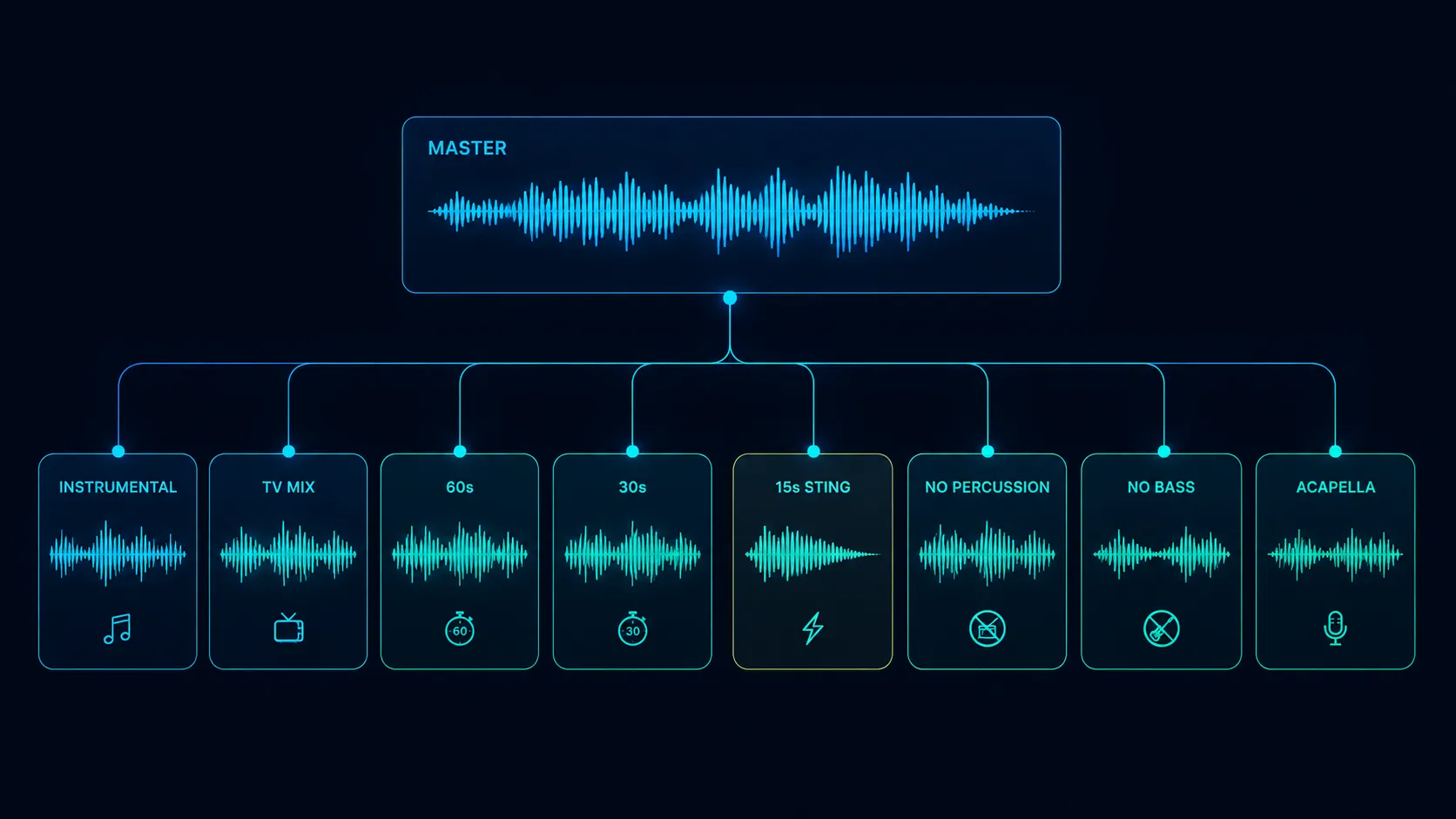
ALT mixes get organized by grouping every alternate version under its parent track with consistent naming, metadata, and a clear hierarchy: master, instrumentals, TV mixes, cutdowns, stings, and stems. Done well, the supervisor never has to ask for a version. Done poorly, every placement involves email back-and-forth.
A working composer or trailer library can have 6 to 15 alternate versions of a single track: instrumental, TV mix, no-drums, no-bass, drums-only, vocals-only, 60-second, 30-second, 15-second sting, plus all the stems. The organization workflow is what turns that pile of files into a usable asset. Composers who get this right ship faster, get more placements, and spend less time on email.
Who does this
Working composers who deliver music for sync. Production music libraries who maintain catalog hygiene. Sync agencies who organize roster catalog. Editors and music supervisors on the receiving end who depend on this organization to do their job.
Indie artists rarely think about ALT mix organization until they get their first sync placement and the supervisor asks for the instrumental. Then they think about it forever.
Step by step
- 1
Define your ALT mix bundle as a delivery standard
Before exporting anything, decide your standard ALT bundle. A typical sync-ready bundle: master with vocal, instrumental (vocals removed), TV mix (vocals reduced 6 to 9 dB for talk-over), 60-second cutdown, 30-second cutdown, 15-second sting, plus stems. Trailer-ready bundles add: no-drums version, no-bass version, percussion-only, plus a dramatic mid-build alternate.
- ✓Sync-ready bundle: 6 to 8 ALT versions
- ✓Trailer-ready bundle: 10 to 12 ALT versions plus stems
- ✓Production library bundle: 12 to 15 ALT versions standard
- 2
Print every ALT from the same source session
Every ALT mix originates from the same locked mix session. The instrumental is the master with vocals muted. The TV mix is the master with vocals turned down. The 60-second is a structural edit of the master. Pulling ALTs from different mix sessions is how you end up with mismatched levels and inconsistent EQ.
- ✓Same session, same plug-ins, same bus settings
- ✓Mute or solo automation drives ALT differences
- ✓Cutdowns edited in the same session, not exported and re-edited
- 3
Use a consistent filename template
Filenames are the single most important organization step. Recommended template: "Song Title (Variation).wav". So you get "Beautiful Tomorrow.wav" for the master, "Beautiful Tomorrow (Instrumental).wav", "Beautiful Tomorrow (TV Mix).wav", "Beautiful Tomorrow (60s Cutdown).wav", and so on. Consistent across every project, forever.
- ✓Master: "Song Title.wav" (no variation suffix)
- ✓Instrumental: "Song Title (Instrumental).wav"
- ✓TV mix: "Song Title (TV Mix).wav"
- ✓Cutdown: "Song Title (30s).wav" or "Song Title (60s).wav"
- ✓Sting: "Song Title (15s Sting).wav"
- 4
Embed ALT-specific metadata in each WAV
Each ALT file gets BWAV metadata that identifies which ALT it is. Title field stays the same (the song name). Add a "Version" or "Variation" tag with the ALT type. Some clients prefer the ALT type appended to the title in metadata. Match whatever your highest-volume clients expect.
- ✓Title: "Beautiful Tomorrow" on every file
- ✓Version field: "Master", "Instrumental", "TV Mix", etc.
- ✓Composer, publisher, year identical across all ALTs
- 5
Group ALTs under parent track in your delivery platform
A modern sharing platform (DropCue, Disco) groups ALTs visually under the parent master. The supervisor sees one playlist entry, expands it, and sees every variation. Without grouping, your playlist looks like 12 separate tracks and the supervisor cannot tell which is which. Grouping is the difference between a clean catalog and a wall of noise.
- ✓Master is the parent (top-level entry)
- ✓Instrumental, TV mix, cutdowns nest as children
- ✓Stems nest as a sub-group under the parent
- ✓Sting and bumper nest as their own variation entries
- 6
Build a manifest text file for offline delivery
When you ship a zip file (still common for trailer use), include a one-page manifest at the top of the zip. The manifest lists every file, what it is, and any notes (e.g., "TV Mix has lead vocal at -7dB, BG vocals untouched"). Editors love manifests. Editors curse zips without manifests.
- ✓Plain text or PDF, one page
- ✓List every file with brief description
- ✓Note any non-obvious choices (vocal levels, key changes)
- 7
Maintain version control across re-mixes
When the master gets re-mixed or remastered, every ALT must be re-printed too. This is one of the most common workflow failures. The composer remasters the album for streaming, then ships old ALTs from a year ago that no longer match. Stem sums fall apart, levels are off, the supervisor catches it within minutes. Always re-print the bundle when the master changes.
- ✓Re-mix triggers full ALT bundle re-print
- ✓Version-stamp the bundle with date or revision
- ✓Old bundles archived, not deleted (in case of disputes)
- 8
Create role-specific playlists
Different supervisors want different things. Trailer supervisors want stems, no-drums, percussion-only, plus stings. TV supervisors want instrumentals and TV mixes. Ad supervisors want 60s and 30s cutdowns. Build role-specific playlists from your master catalog: one for trailer pitches, one for TV, one for ads. Send the right playlist to the right person.
- ✓Trailer playlist: master + stems + no-drums + stings
- ✓TV playlist: master + instrumental + TV mix
- ✓Ad playlist: master + 60s + 30s + 15s
- 9
Audit your catalog quarterly
Every 90 days, review your catalog. What is missing an instrumental? What is missing stems? What got remastered without ALT updates? What needs a 30-second cutdown that did not have one before? Audit, fix, ship. A clean catalog converts pitches at much higher rates than a fragmented one.
- ✓Calendar reminder for quarterly audit
- ✓Spreadsheet with one row per song, columns for each ALT
- ✓Fill in gaps before the next pitch wave
- 10
Document your ALT delivery standard
Write a one-page spec of your standard ALT bundle. Filenames, formats, sample rates, metadata. Share it with collaborators and clients. When someone asks "what versions do you have," you send the spec. This sounds boring and is one of the highest-leverage organization steps.
- ✓One-page PDF or shareable doc
- ✓Lists every standard ALT with format spec
- ✓Updated when standards change
What can go wrong
- ●Inconsistent naming across the catalog. Some songs have "Instrumental" suffixes, some have "(No Vox)", some have "Inst". The supervisor cannot search reliably and ends up emailing you for clarifications.
- ●Levels do not match between master and ALT. The instrumental is 3 dB louder than the master because the vocals were doing duck-compression. Editor catches it and asks for a fix.
- ●TV mix has the vocal still in but at full volume. Classic mistake from using a different session for ALTs. Vocal automation got reset.
- ●Forgetting to update ALTs after a remix. The composer ships the old instrumental which is still based on the previous master mix. Supervisor compares and notices.
- ●Sending ALTs as separate playlist entries instead of grouping under the parent. Looks chaotic, supervisor ignores half of them.
Pro tips
Build your ALT bundle template into your DAW once, and every project gets exported the same way. Pro Tools, Logic, Cubase, and Reaper all support stem export templates. The 30 minutes you spend building the template saves you hundreds of hours over a career.
The instrumental version is the single most-requested ALT across every genre. If you are going to print one ALT, print the instrumental. Many composers print only this one and skip TV mixes, then deliver TV mixes on request. It is a reasonable shortcut at low volume.
For trailer composers: always print a "no percussion" version. Trailer editors love percussion-free underscores under voiceover, then they swap in a different percussion bed for the climactic drop. Having no-percussion already printed is an instant placement advantage.
When you are working with a publisher or sync agency, ask them for their preferred ALT bundle spec. Most have one. Match it. The agency will work harder for the composer who delivers correctly the first time.
Stems can replace some ALT mixes but not all. An editor can build an instrumental from stems if the vocal is on its own stem. They cannot easily build a TV mix from stems because TV mixes have specific vocal-down automation. Print the TV mix yourself.
Tools that help
DropCue
DropCue is built around the ALT mix grouping problem. The composer uploads master + instrumental + TV mix + cutdowns + stems and DropCue auto-groups them under the parent track. The supervisor sees one entry, expands it, and accesses every variation. This replaces the legacy zip-of-loose-files workflow that forces both sides to do extra work.
DISCO.ac
Supports ALT version grouping under parent tracks. Long-time market leader. Used at most large agencies. Slower interface and more expensive at scale, especially for storage of stem-heavy catalogs.
Catalog spreadsheet plus Dropbox
The system many indie composers actually run. Functional, but no version grouping in the share UI, no analytics, no auto-organization. Fine for a 50-track catalog. Painful at 500.
BWAV / ID3 batch tagging tools
Wave Agent (free, Mac), BWF MetaEdit (free, Mac/PC), ID3 Editor. Used to batch-edit metadata across an ALT bundle so every file has consistent fields without re-exporting from your DAW.
