What is the best way to share music with music supervisors?
Updated · By Marc Aaron Jacobs
Send each supervisor their own streaming link instead of attachments, with a password and an expiry date on Artist, Pro and Studio from $8 a month billed annually, and on Pro and Studio, from $15 a month billed annually, see what each supervisor played.
Watch: Getting started: upload, share and see who listens (1:01)
Get started with DropCue in four steps: upload your music, let AI fill in mood, genre and tags, build and share a playlist with one private link, then see who listened and which parts they heard.
One minute: upload your music, share a playlist with one private link, then see who listened and which parts they heard.
Video transcript
New to DropCue? Four simple steps take you from upload to your first listener. Step one: upload your music. Drag in your songs. We read the details already in each file. Step two: get it ready. AI fills in the mood, genre and tags for you. Group songs into an album, with its own cover art. Step three: build a playlist. Pick your songs and give it cover art. AI can even make the cover for you. Then send one private link. Downloads, passwords and expiry are up to you. Step four: see who listened. Find out who played what, and where they are listening. Then build your portfolio page: one link that shows off your best work, ready for supervisors. Find this guide anytime under Getting started. Welcome to DropCue.
How to do it
- Send a link, not attachments. Put the tracks in a playlist and send one streaming link. It plays straight away and keeps files out of their inbox.
- Keep it short. Only the tracks that fit the brief, strongest first. Name the playlist after the project or brief so it is easy to find later.
- Fill in the credits. On each track, add the writers and publishers with their splits, so you can answer clearance questions straight away.
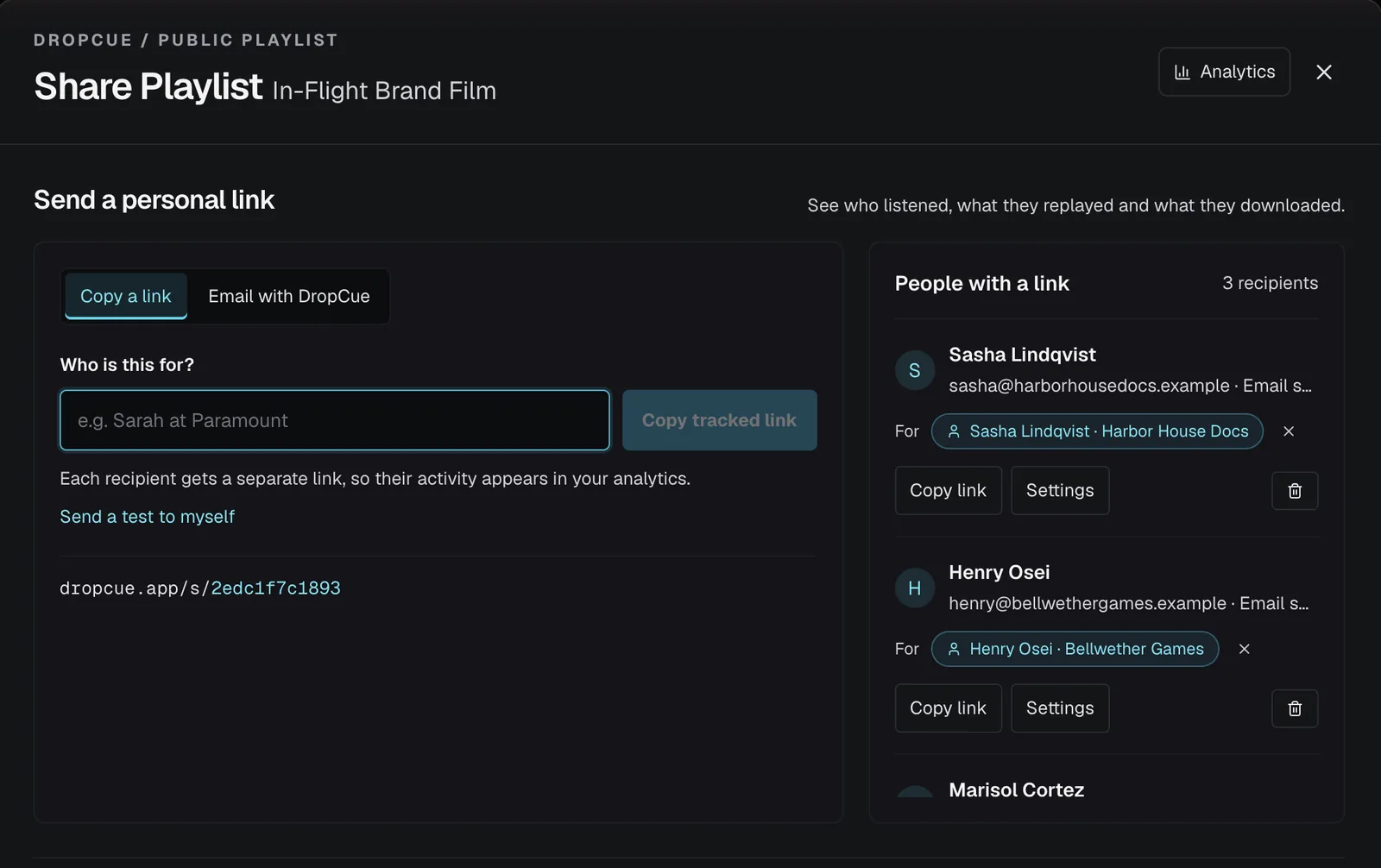
- Give each supervisor their own link. Click Share playlist, type their name under Who is this for? and click Copy tracked link. To add a password or an expiry date, see How do I send music to a music supervisor privately?
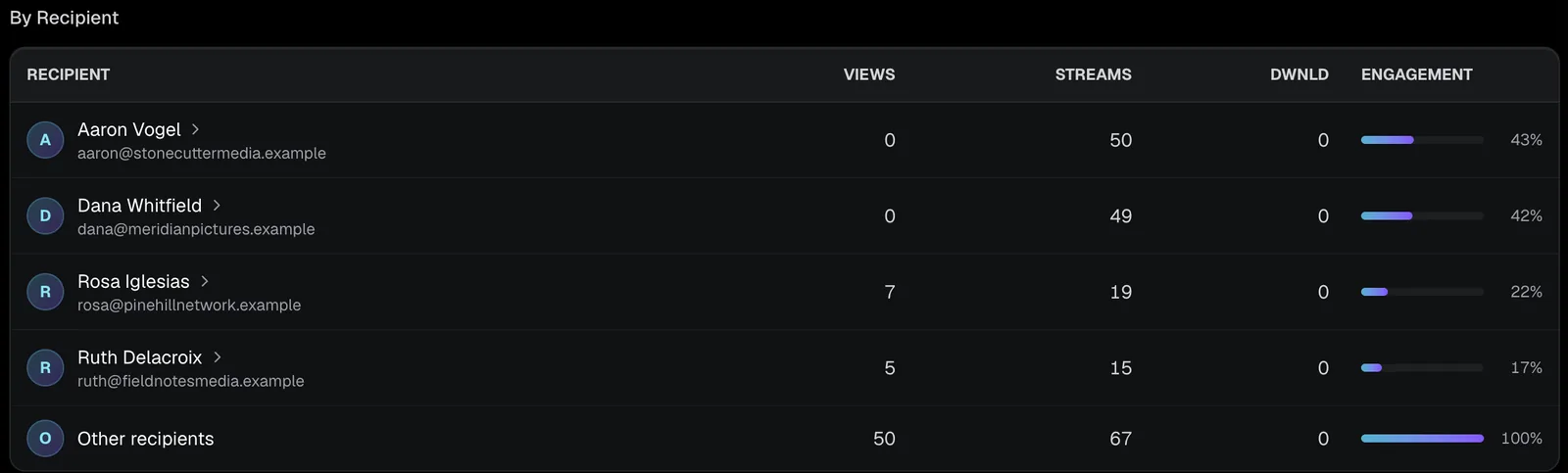
- Check before you follow up. On Pro, open Analytics, then the playlist, and click their name to see what they played and how much of each track they heard.
Can I email the link from DropCue instead of copying it?
Yes. In the share window, switch from Copy a link to Email with DropCue, type the person's name and email address, and click Send email. Names from your Contacts are suggested as you type. Each person gets their own tracked link.
The email comes from your name via DropCue, and replies go to your own email address. You can send to up to 25 people at once. If the link has a password, it goes in the email. Your Note to recipients is included too. Click Send a test to myself first to see the email exactly as they will.
What can I control on the page the supervisor sees?
Under What recipients see, you choose whether to show your About section, social links, your name and logo, the top bar, lyrics and Track versions. On Artist some of these are labelled Short bio and Website link. Comments and feedback, which lets a supervisor leave a note at a point in a track, is on Pro and Studio.
Under Appearance and note, set Display mode to Dark or Light and write a short Note to recipients. Light is not offered on The Marquee and other dark designs. When downloads are on, the supervisor gets a Download playlist button with All as Original for the highest quality, plus All as MP3 for smaller files when MP3 versions exist.
Can I give the link a cleaner address?
On Pro and Studio, once you have set your portfolio URL, each playlist link also gets a readable address, dropcue.app/your-name/playlist-name, made from the playlist title. Click Customize URL in the share window to change it: lowercase letters, numbers and hyphens, at least 3 characters, not starting or ending with a hyphen. If you already use that name on another of your links, DropCue says You are already using this slug on another link.
The original link keeps working. DropCue calls it the Permanent link: it never changes, whatever you do to the custom URL, and it is the one DropCue emails use. So you can rename the custom address later without breaking links you already sent.
Good to know
- ●The supervisor streams in the browser and does not need an account.
- ●On Pro, a separate link for each supervisor shows you each one's listening history.
- ●On Pro, alt mixes and instrumentals sit under their main track, so a supervisor finds every version in one place.
“DropCue should have come along, long ago. Over my career as a composer/arranger, there has been so little opportunity to easily get stuff heard. DropCue makes it ridiculously simple to have all that you want others to hear in one place... available 24/7. Thanks for gettin’ it right the first time out, guys!”
Questions
Should I send attachments or links?
A link. It streams straight away, can carry a password and an expiry date, and shows you what was played.
When should I follow up?
Check what they played first. A follow up about the track they replayed lands better than a general reminder.