How do I see who listened to my playlist?
Updated · By Marc Aaron Jacobs
Send each person their own tracked link, and DropCue shows who listened on Pro and Studio, from $15 a month billed annually.
Watch: See who listened to your playlist (0:38)
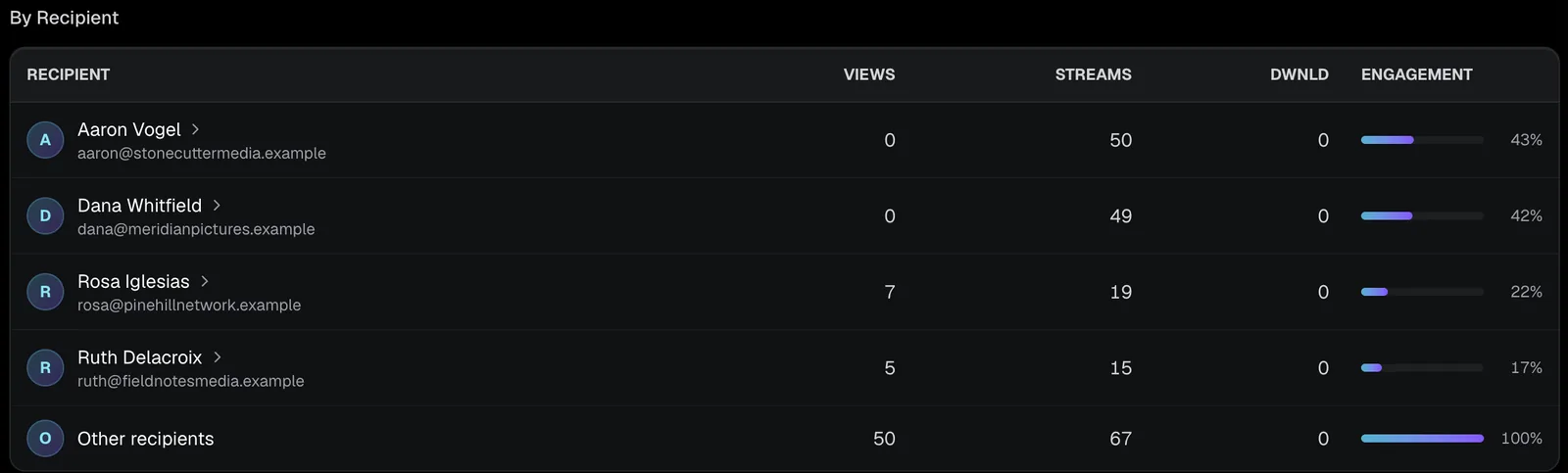
See exactly who listened to the playlist you sent: copy a tracked link for each person, then open the playlist's Analytics and read By Recipient to see what each person played, for how long and which parts they heard.
Under a minute: one tracked link per person, then By Recipient shows what each of them played.
Video transcript
Here's how to see exactly who listened to the playlist you sent. Open the playlist and click Share playlist. Type who it's for, then click Copy tracked link. Each person gets their own link. Send it the way you usually do. Then open Analytics to see page views, streams and downloads. By Recipient shows every person you sent it to, and what they did. Click a name to see each track they played, for how long, and which parts they heard. Per-listener analytics are on Pro and Studio, from fifteen dollars a month, billed annually.
How to see who listened
- Open the share window. Open the playlist and click Share playlist.
- Make a link for each person. Under Who is this for?, type the person's name and click Copy tracked link. Each recipient gets a separate link, so their activity is logged under their name.
- Send it. Paste the link into your email or message. They listen in the browser and do not need an account.
- Open the playlist's analytics. In the sidebar, open Analytics, then the playlist. The By Recipient table lists views, streams and downloads for each person.
- Click a name. Click a recipient's name to see every track they played: listen time, how much of it they heard, plays and replays, and a Skipped tag.
Do my own plays count when I test the link?
No. If you open your own share link while you are signed in to DropCue, your plays are not recorded. You can check the page, play every track and look at the downloads without adding anything to your numbers.
To see the page the way a recipient does, click Send a test to myself in the share window. DropCue emails you the link so you can check how it looks on your phone or in another browser before you send it to anyone else. If you open it while signed out, or on a device where you are not signed in, those plays do count, so open test links while signed in.
What happens if someone forwards their link or I post an untracked one?
Plays are logged against the link, not the device. If a supervisor forwards their personal link to a colleague, those plays still show under the supervisor's name, so a sudden jump in plays on one name can mean the link was passed around.
When you need a general link, for a post or a newsletter, use Copy untracked link under Other sharing options. Plays through it are not tied to one person. Unless the listener's email matches someone you sent a link to, they are grouped in the By Recipient table in a row called Other recipients.
What else does the playlist analytics page show?
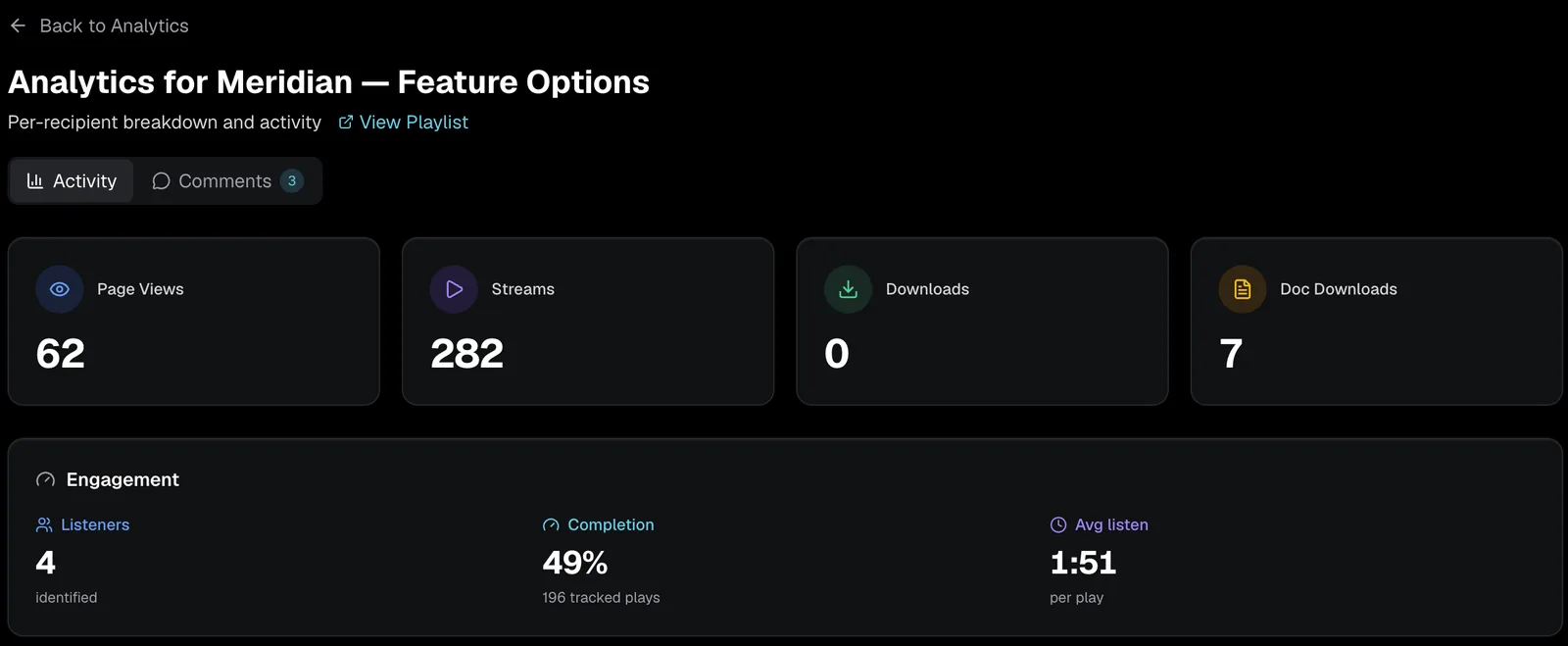
Above the By Recipient table, four cards give the totals for the playlist: Page Views, Streams, Downloads and Doc Downloads. An Engagement card shows Completion, Avg listen and the number of Listeners.
Below that come Top Tracks, with Most Played and Most Downloaded tabs, and a world map called Where your music is heard with a country list, once there is data to show. Then the By Recipient table and Recent Activity. A second tab, Comments, collects the timestamped comments people leave on the tracks. Comments are on Pro and Studio, the same plans as the rest of this page. On Artist, this page shows an upgrade prompt instead of the numbers. A View Playlist link at the top takes you back to the playlist itself.
What each number means
- ●Listened is the time the track actually played. Plays recorded before mid October 2026 can include paused time.
- ●Heard is the share of the track they heard at least once. A strip under it shows which parts.
- ●Replays count each time they started the track again, plus any play in which they heard about 5 seconds or more of it a second time.
- ●Skipped means every play stopped without finishing before 30% of the track, or before 20 seconds when the track's length is unknown.
- ●Pauses are not tracked, so DropCue does not show when or how often someone paused.
- ●Albums work the same way: open the album in Analytics and click a name.
Questions
Does the listener need a DropCue account?
No. They open the link and listen in the browser.
Can I see who listened on the Artist plan?
No. Seeing who listened, person by person and track by track, is on Pro and Studio.