How do I send music to a music supervisor privately?
Updated · By Marc Aaron Jacobs
Send a tracked share link with a password and an expiry date, which are on Artist, Pro and Studio from $8 a month billed annually, and on Pro and Studio, from $15 a month billed annually, you also see what the supervisor played.
Watch: Send music to a music supervisor privately (0:44)
Send music to a music supervisor privately: a tracked link of their own, a password and an expiry date, downloads on or off, settings for one person, and on Pro and Studio a record of what they played.
Under a minute: a tracked link per supervisor, a password and expiry, and downloads on or off.
Video transcript
Here's how to send music to a music supervisor privately. Open the playlist, click Share playlist, and type the supervisor's name. They get their own tracked link. In Link settings, add a password and an expiry date, so the link only works for as long as you want. Choose whether they can download the files, or only stream them. You can also turn off downloads, or end access sooner, for one person without touching anyone else. They listen in the browser, with no account needed. And on Pro and Studio, you see exactly what they played. Private links with passwords start on Artist, from eight dollars a month, billed annually.
How to send it
- Make a playlist. Put the tracks you want to pitch in a playlist.
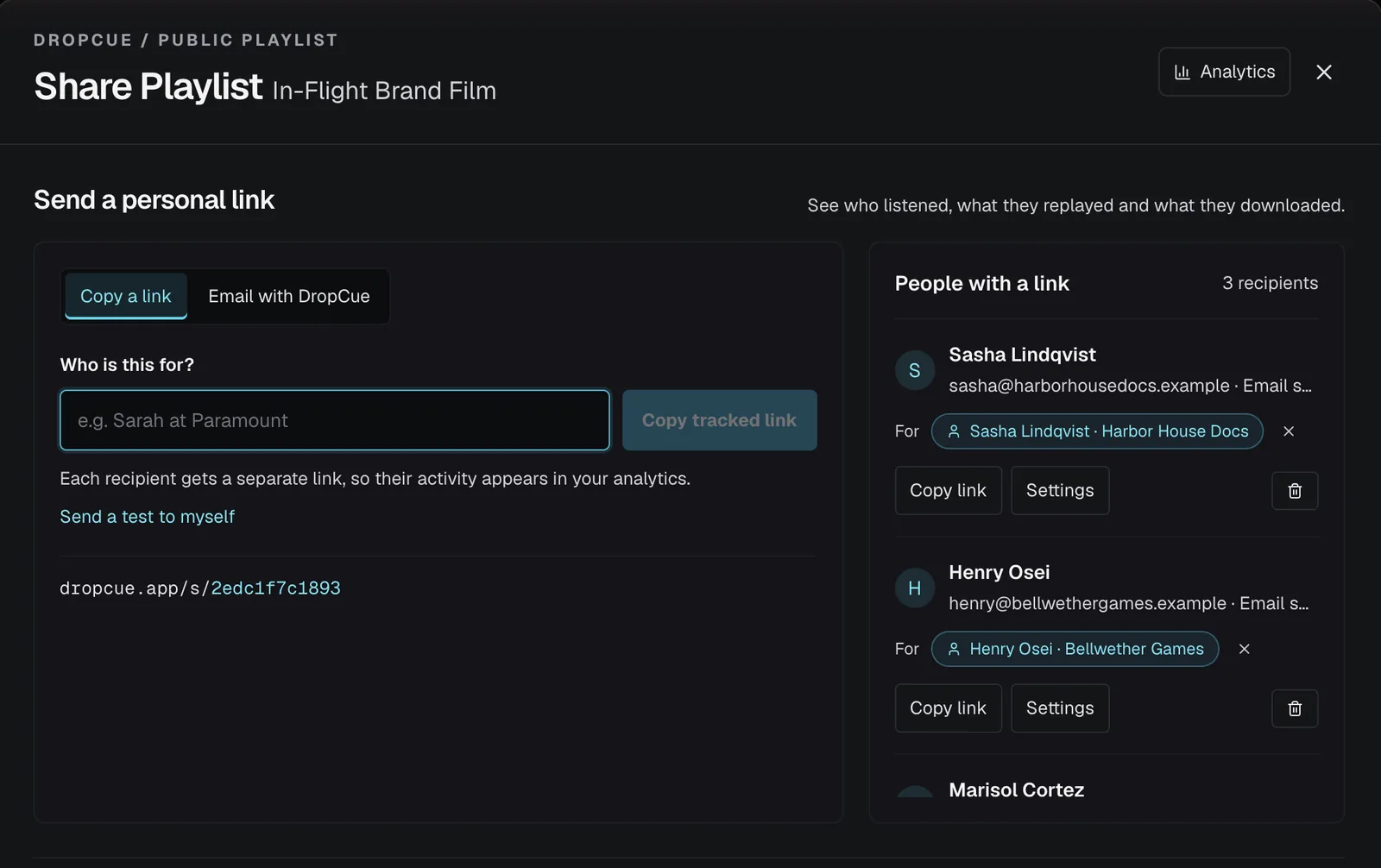
- Make their link. Click Share playlist. Under Who is this for?, type the supervisor's name and click Copy tracked link.
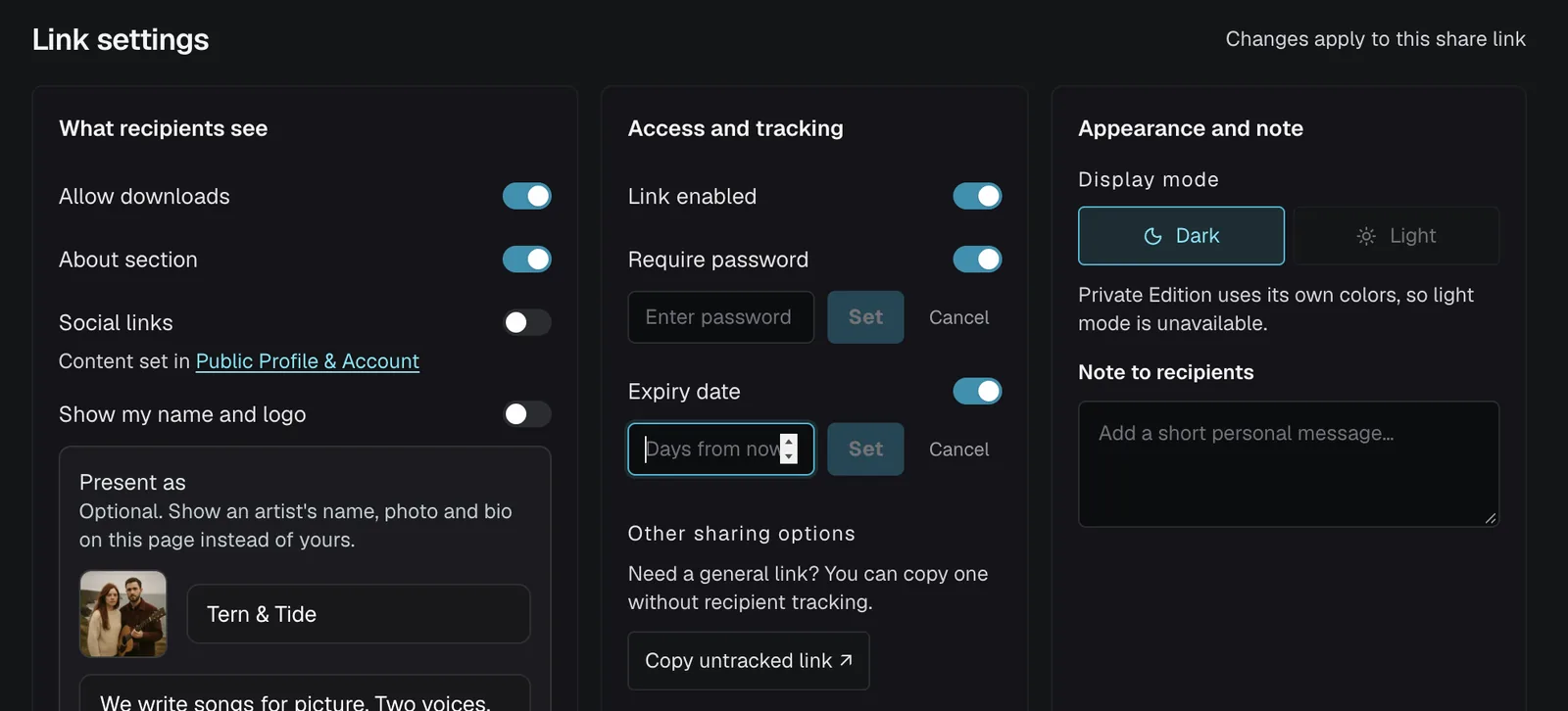
- Lock it down. Under Link settings, turn on Require password and set an Expiry date in days.
- Decide on downloads. Turn off Allow downloads if you only want them to stream.
- Send and check. Send the link and the password. Then open Analytics and the playlist to see when they opened it and what they played.
What happens when the link expires or I turn it off?
Once the expiry date passes, the page shows This link has expired, and the music will not play. If you turn off Link enabled, or delete the link, the plain link says This link isn't available. It may have been turned off or removed.
If you remove one person from People with a link, only their personal link stops. They see This link is no longer active. Please contact the sender for an updated link. Everyone else keeps listening. A Custom Expiry set for one person works the same way, for that person only.
Should I turn the link off or delete it?
Turn it off. Link enabled stops the link working for everyone and keeps all your plays and comments, and you can switch it back on later. Deleting the link removes it for good, along with all of its plays, downloads and comments. DropCue asks you to confirm before it deletes a link.
To give the link more time, switch Expiry date off and on again and type a new number of days. The count starts from the day you set it. To end one person's access sooner than everyone else's, open their overrides and set a Custom Expiry date. It cannot run past the link's own expiry.
How do I stop one supervisor downloading while others can?
Open the person's overrides in People with a link and set Allow Download to No. The choices are Inherit from share, Yes and No, so each person can follow the link setting or have their own. The panel is headed Overrides for and the person's name, and Clear removes a custom expiry.
This only changes their personal link. The plain share link still allows downloads for anyone who has it, including that person. If downloads matter, keep Allow downloads off on the link itself and turn them on per person instead.
Good to know
- ●The supervisor listens in the browser and does not need an account.
- ●Allow downloads can be switched off on every plan.
- ●You can give one recipient their own expiry date or download setting.
- ●Turn off Link enabled to close the link at any time. Your stats are kept.
Questions
Does the supervisor need a DropCue account?
No. They open the link and listen in the browser.
Can I stop them downloading the files?
Yes. Turn off Allow downloads on the link, on any plan.